Bright props store with shelves of theatre props, packing crates, and period furniture

Open beta

The Props List

Props software for every show

Theatre props management software built by people who work in the industry — one shared list for inventory, packing, shopping, and hire.

What this means for you

The app is live. Create a free account and start using it on a real show today — there is no waitlist. You may hit the odd rough edge, and some features will still change. Please send feedback; it shapes what we ship next.

Free to try on web and Android. Get the Android app See pricing Get product emails

Container

Loading…

The problem

Props information is scattered and everyone feels it

When status lives in inboxes, spreadsheets, and hallway conversations, nobody has a clear picture. Transparency breaks down, creative notes get lost, and stage management can’t get a straight answer about what’s ready.

  • No shared picture of the show Props move between stores, vans, and dressing rooms — without one reference point, the department spends hours hunting and repeating the same updates.
  • Communication overload Photos, shopping options, and approvals get buried in group chats and email threads instead of sitting with the prop they belong to.
  • Handover guesswork Packing, labels, and the props bible live in different places — so rehearsals, touring, and strike start with missing context.

Our approach

A single point of reference for all things props

The Props List is props software built by people working in this industry. The aim is simple: improve transparency and communication about show props by giving every role — props, stage management, creative — one place to look.

Capture the show once

Build your inventory with photos, status, and notes — from the desk or on the fly from your phone — so everyone sees the same list, not five versions of the truth.

Keep the conversation on the prop

Shopping, tasks, and updates stay attached to the items they affect, so communication is clear instead of scattered.

Hand over with confidence

Packing, labels, QR codes, and your props bible come from the same reference — ready for rehearsals, touring, and strike.

What’s in beta

Every main section of the web app — and why it exists

Designed around real props department workflows. Each area solves a concrete business need: less hunting, clearer handovers, and one shared picture of the show — on Android and the web at launch, with an offline-first experience that syncs when you’re back online. An iOS version is in the pipeline, with macOS planned for workshop and office use.

Props & Inventory

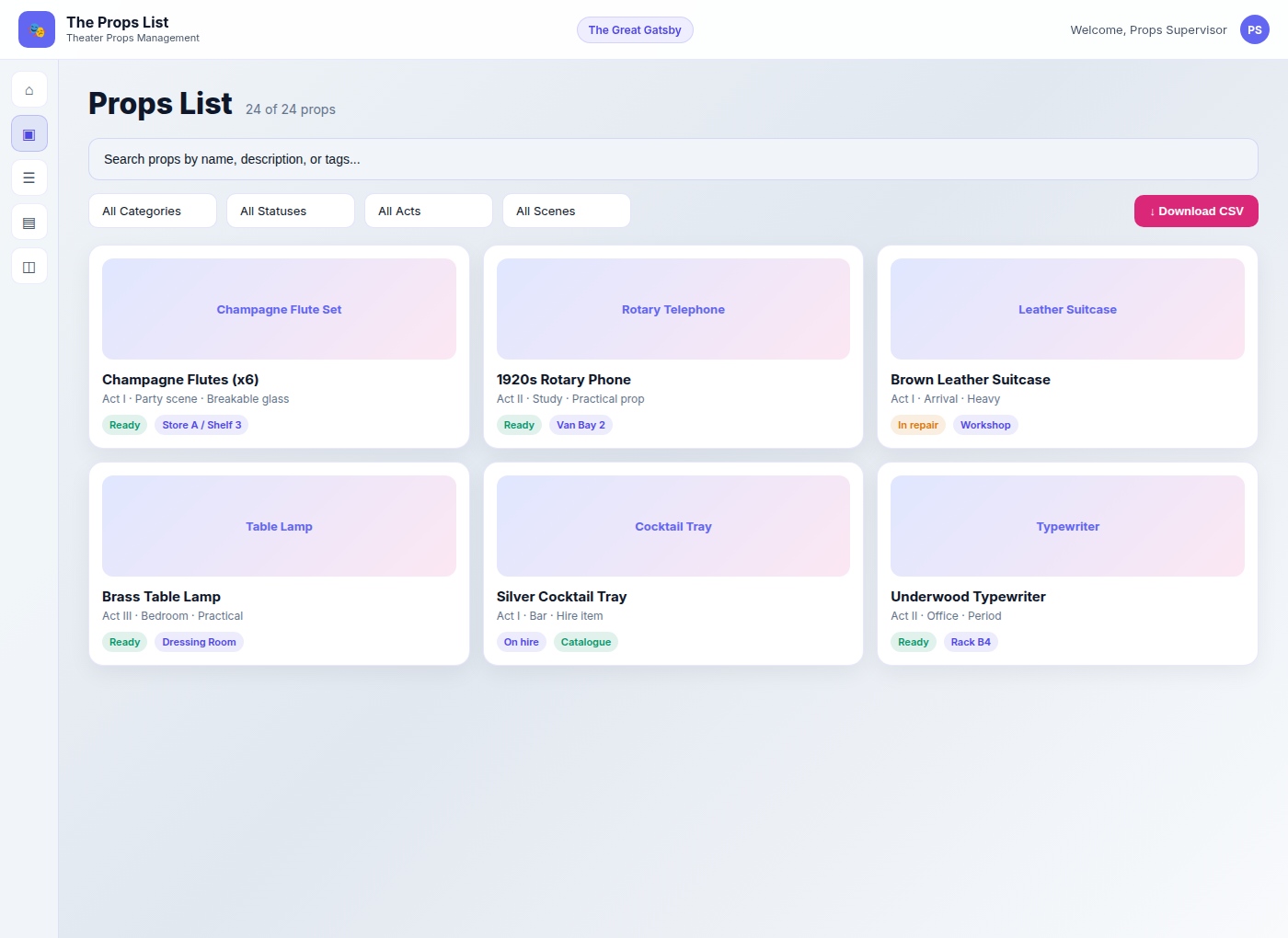
Props inventory software for every item on the show: search and filter, photos, locations, act and scene, quantities, and status — so the whole team can see what’s where, and what’s ready.

Business need Without one inventory, status lives in spreadsheets, chats, and hallway updates. The department wastes hours hunting props and answering the same “is it ready?” question from stage management and creative.

Props Inventory in The Props List light theme with search, filters, and prop cards

Props Store inventory

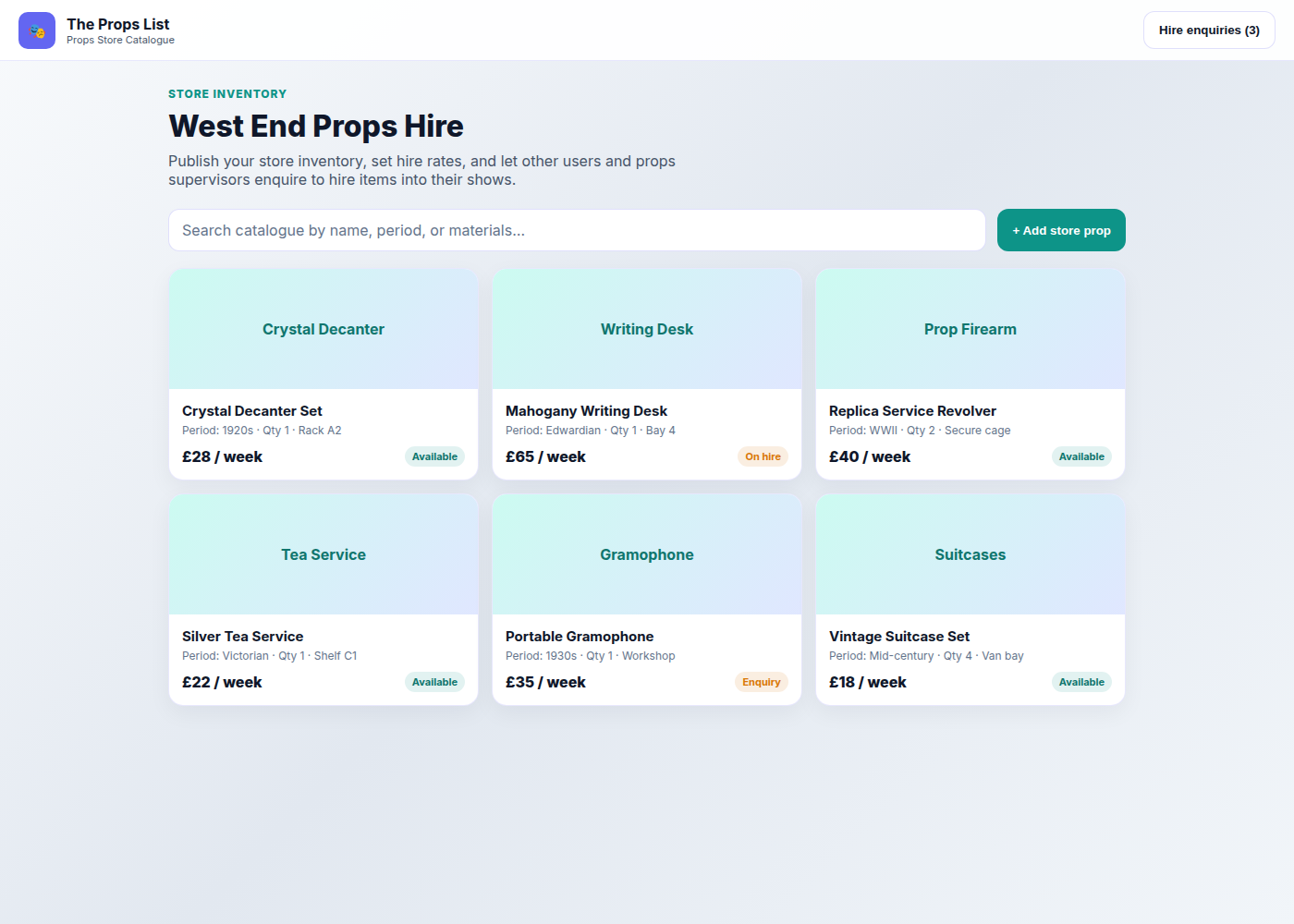
Run a hire house or props store from the same system. Catalogue permanent stock with locations, periods, materials, and hire rates — then publish a searchable catalogue so other users and props supervisors can enquire to hire your props into their shows.

Props Store catalogue showing hireable inventory with weekly rates and availability

Packing lists

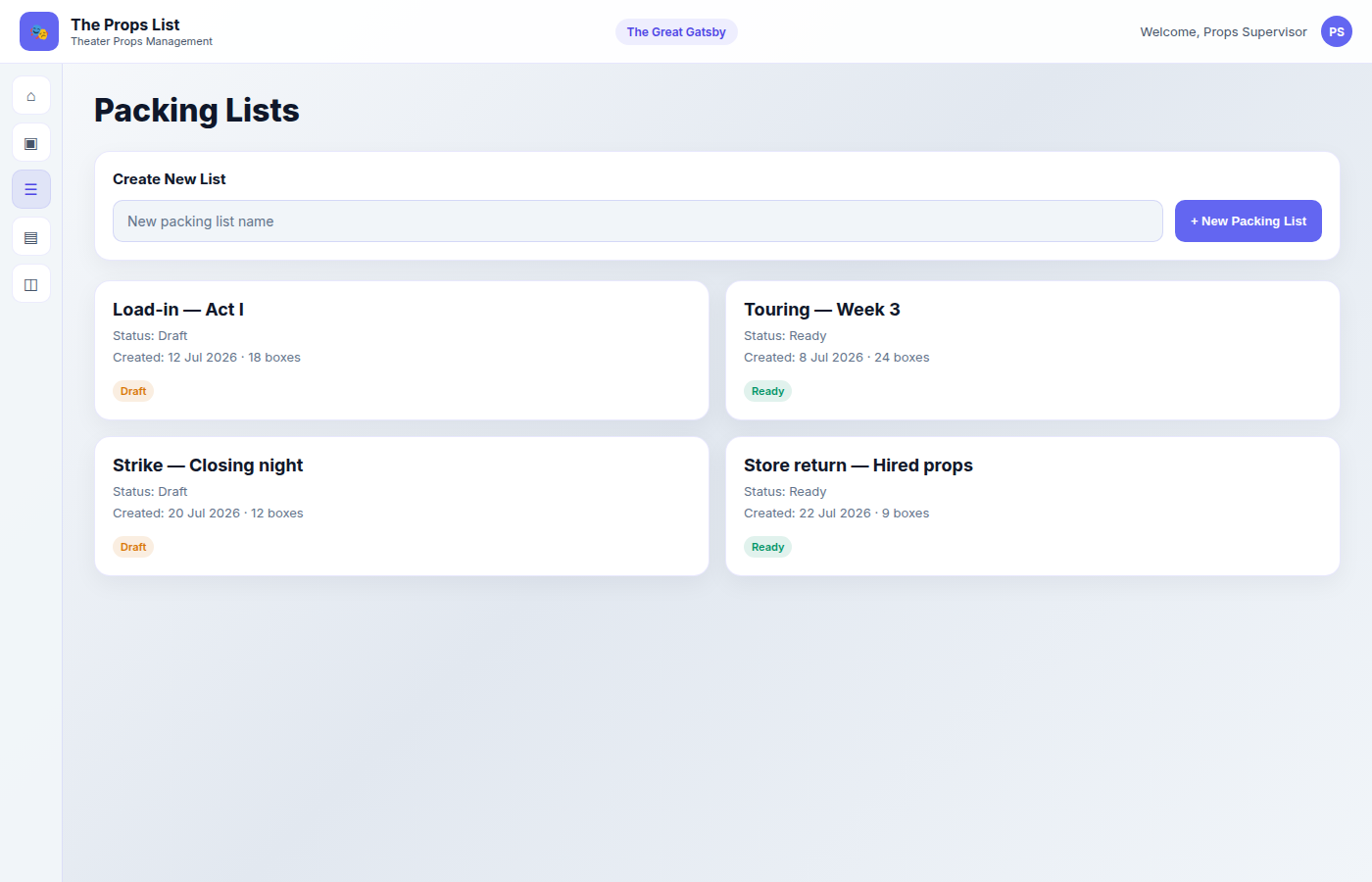
Organise containers and packing from the same inventory. Build clear lists for load-in, touring, and strike — with labels and QR-friendly container views so everyone works from one picture of the show.

Business need Props move between store, van, and stage. When packing lives in a different file from the inventory, rehearsals and strike start with missing crates, wrong labels, and guesswork about what travelled.

Packing Lists screen in The Props List light theme

Todo List / Task boards

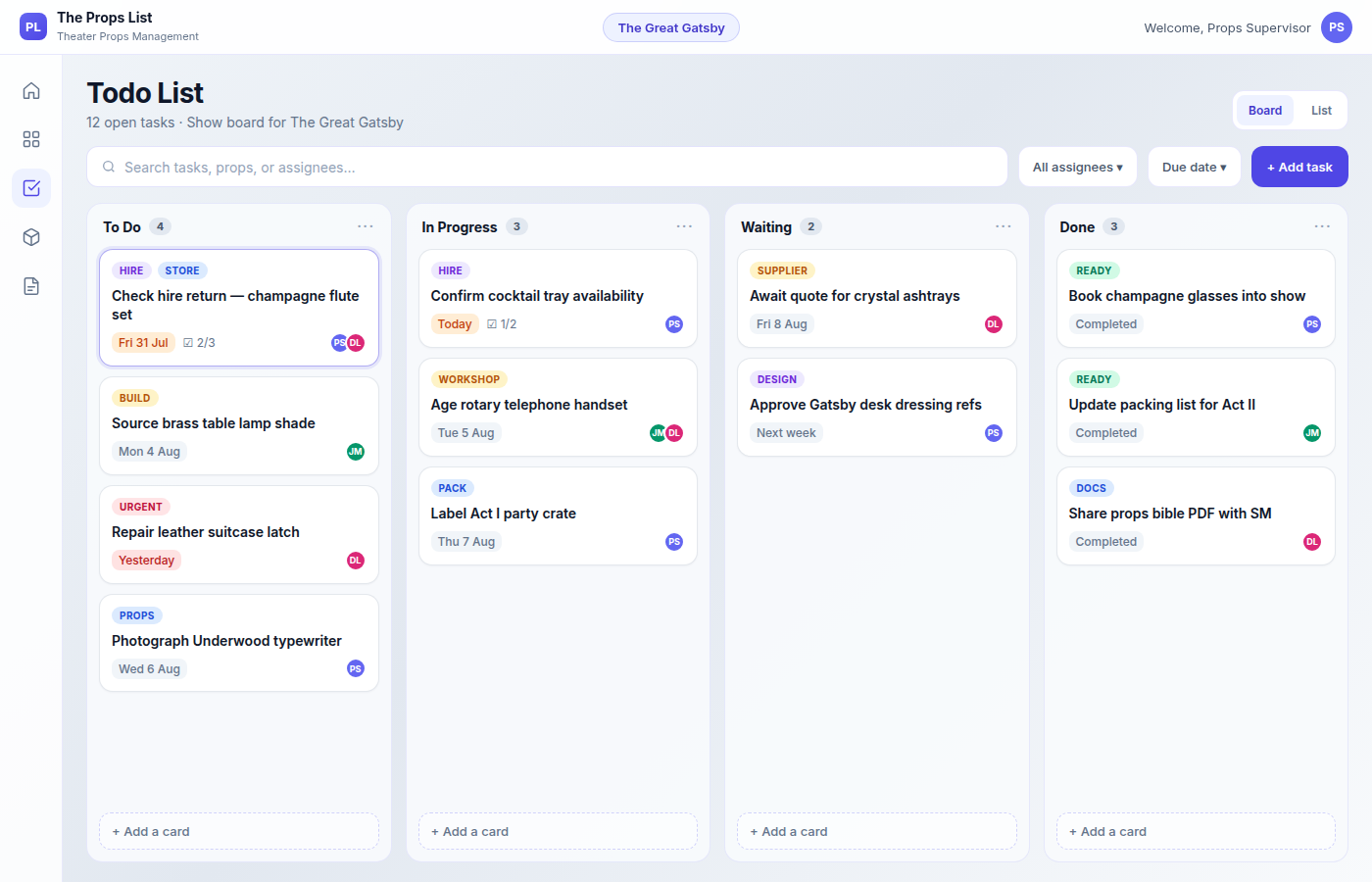
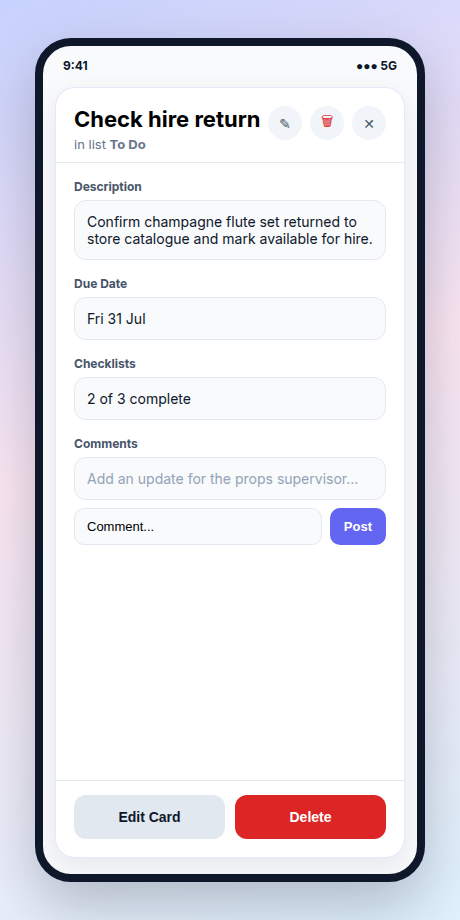
Kanban boards for making, repair, and prep work: assign tasks, set deadlines, track checklists and comments — progress stays transparent on web and mobile, with notifications when work needs attention.

Business need Props departments run on deadlines that don’t survive another email or Slack chain. When work isn’t visible against the show, jobs slip, ownership is unclear, and supervisors can’t see what’s blocking rehearsals.

Todo List board in The Props List light theme with task columns, due dates, and assignees

Digital Props Bible

Your props bible stays digital and live — the best way to keep it up to date as inventory, status, and notes change. Everyone works from the same current picture of the show. When you need a hard copy or a file to share, export to PDF or CSV from that same live data.

Business need A props bible only helps if it’s current. Spreadsheet handovers and old PDFs create version conflicts for stage management, creative, and visiting companies. A digital props bible stays in sync with the show; PDF and CSV export are there when you need paper or offline packs.

Digital props bible with PDF and CSV export options in The Props List

Show management

Each production is its own workspace — dates, venues, acts and scenes, contacts, and archive — so inventory, tasks, packing, and shopping stay scoped to the right show.

Business need Departments juggle overlapping shows. Mixing props and tasks across productions causes wrong lists at the wrong venue and makes archive and reuse harder than it should be.

Shopping lists

Create shopping items with photos and links. Your team suggests options; you approve the best ones — then convert purchases into props when they’re in.

Business need Purchase decisions buried in group chats mean double-buying, lost links, and no audit trail. Keeping options on the item keeps spend visible and approval clear.

Invite your team

Bring in viewers, editors, supervisors, and art directors with access that matches how your department actually works — same reference, appropriate permissions.

Business need Props, stage management, and creative all need the truth — but not the same edit rights. Role-based access stops “email me the latest list” without opening the inventory to accidental changes.

Hire to other departments

Use Props Store inventory to list stock for hire, take enquiries from other users and props supervisors, and hand items into their shows cleanly.

Start free — open beta

Work anywhere

Floor and desk, one live props list

Plan shows, packing, and handovers on the web. Capture and update from the Android app on the floor. Same account, same shows, same inventory — so what happens in the store or wings lands in the shared list, not in another group chat. An iOS version is in the pipeline for the same floor-first workflows.

  • Web and mobile, one system Use the web app for the digital props bible, packing plans, shopping, Props Store, and team access. Use Android in the warehouse, van, or backstage with the same live data. Update either place and the whole team sees the current picture.
  • Add information on the fly From your phone: add props, take photos, change status, scan QR labels, and move packing or tasks forward while you’re standing next to the item — including offline, with changes syncing when you’re back online.
  • Notify people of changes and tasks When work is assigned, shopping needs approval, or a prop status changes, the right people get notified — so supervisors and makers aren’t last to know, and progress doesn’t stall in unread chats.
  • Android now · iOS & macOS next Android is in open beta for floor-first work. iPhone, iPad, and Mac versions are on the way so every device can share the same workflows.

Business need Departments lose hours when floor discoveries never reach the desk list, and when status changes only live in hallway conversations. Connecting mobile capture to the shared web reference — and alerting the people who need to act — stops “is it ready?” from becoming a full-time job.

Start free Get the Android app

The Props List Android app showing on-the-fly task updates that sync with the web app

Pricing

Simple plans for every production scale

Start free, or pick a paid plan below. You’ll create an account, add your details, then choose a plan in the app. Paid plans continue to Stripe. Existing customers can sign in as normal and upgrade from their profile. Billing is on the web only — not inside the Android app. This is open beta: expect the odd rough edge, and please send feedback.

Billed monthly Billed yearly (save ~10%)

Free Free Forever

1 show (1 year). 10 props. 2 boards. 20 packing boxes. TPS branded PDFs. 3 teammates.

£0

Start free

Starter

3 shows. 50 props. 5 boards. 200 packing boxes. TPS branded PDFs. 5 team members.

£9/mo or £90/yr

Get Starter

Pro

100 shows. 1,000 props. 200 boards. 10,000 packing boxes. Unbranded PDFs, CSV export. Priority support. 100 team members.

£39/mo or £390/yr

Get Pro

Compare plans

Feature Free Starter Standard Pro
Shows1310100
Props10501001,000
Boards2520200
Packing boxes202001,00010,000
Team members3515100
Unbranded PDFs / CSV
Priority support

Create a free account

Open beta · Built by people in theatre · One point of reference for show props · Billing on the web

FAQ

Questions, answered

Has The Props List launched yet?

Yes — we are in public open beta. Create a free account on the web, try the Android app, and tell us what to fix. iOS is still in the pipeline.

What does open beta mean for me?

The app is live and free to try — there is no waitlist. Create an account and use it on a real show today. Features can still change, you may hit the odd rough edge, and we ask you to send feedback so we can fix what matters.

Who is building this?

People who work in the theatre industry. The Props List is shaped by real props department workflows — not generic project software with theatre labels stuck on.

What is props software?

Props software is a digital system for tracking theatre props — inventory, status, packing, shopping, and handover — so the department shares one list instead of spreadsheets and group chats. The Props List is props software built for theatre workflows.

What problem does it solve?

It improves transparency and communication about show props by giving everyone a single point of reference: inventory, shopping, packing, tasks, and handover in one place.

What is a digital props bible?

A props bible is the production’s reference for every item on the show. A digital props bible stays in sync as inventory, status, and notes change, then exports to PDF or CSV when you need a hard copy or an offline pack.

Is there an Android or iOS app?

Yes. An Android app ships for work on the floor, in the store, or on the road — with the same account and live data as the web app. An iOS version is in the pipeline for iPhone and iPad, and macOS is planned for workshop and office use.

How do the mobile and web apps work together?

They’re one system. Plan and hand over on the web; add props, photos, status, packing, and tasks on the fly from your phone. Offline changes sync when you’re back online, so the desk and the floor always share the same picture of the show.

Will people get notified of changes and tasks?

Yes. When tasks are assigned, shopping needs approval, or prop status changes, the people who need to act get notified — so work doesn’t stall in a group chat nobody checked.

Can I hire out props from my store inventory?

Yes. Props Store is built for hire houses and props stores: catalogue permanent stock, set hire rates, publish a searchable catalogue, take enquiries from other users and props supervisors, and send hired items into a show as normal props. Available for Standard and Pro at launch.

What is included in the free tier?

At launch: one show for a year, 10 props, 2 boards, 20 packing boxes, TPS-branded PDFs, and up to 3 teammates — free forever at that capacity.

Can I use this for multiple shows?

Yes. Starter supports 3 shows, Standard 10, and Pro 100. Need more on Standard or Pro? Add-ons will be available at launch.

How do I pay for a plan?

Choose a paid plan on this page. After you sign in or create an account, you’ll continue to Stripe to pay. The Android app does not sell subscriptions — it uses the same account and plan as the web app.

How do I get updates?

Create an account to start using the app. Optionally leave your email in the product emails form on this page for news — no spam.

Where is the privacy policy?

Privacy, terms, and account deletion are linked in the footer. Direct links: Privacy Policy, Terms, Delete account.


Hire inventory

Props Store

Run a hire house or props store from the same system. Catalogue permanent stock, set hire rates, and let other users and props supervisors enquire to hire items into their shows — then send accepted hires into a production as normal props.

Manage the props you keep

Track permanent stock with locations, periods, materials, quantities, and status — separate from show-specific inventory, so your store stays organised between productions.

Business need Hire houses and props stores shouldn’t need a second system. When permanent stock lives outside the show tool, catalogues go stale, enquiries get lost in email, and sending hired items into a production becomes manual double-entry.

  • Private or public catalogue Keep stock internal, or publish a searchable catalogue other users can browse.
  • Hire enquiries Receive requests from other users and props supervisors, then accept, decline, or fulfil them.
  • Send to show Hand hired items into a show as production props, with stock and availability kept in sync.

Available at launch for Standard and Pro as a Props Store add-on (1 store and 500 store items to start; extra store capacity packs available).

Props Store catalogue showing hireable inventory with weekly rates and availability

Start free — then add Props Store

Props hire

Browse props available to hire

Public hire stores list stock in the catalogue. Search by period, category, and style — then request a hire for your production.

View hire catalogue Manage a props store

Product emails

Want news without signing up?

The app is already live — you don’t need to wait. Leave your email if you’d rather hear product updates first. No spam.

We’ll only email product news. Ready to use the app? Start free.

Optional: Provide your name to personalise our communication

Try the open beta

The Props List is live for public testing — props software for clearer communication, with Android and web sharing one list, iOS in the pipeline, and Props Store inventory for hiring to other users and supervisors.

Start free